Azure Citadel
  • Blogs

  • Azure Arc
    • Overview
    • Azure Arc-enabled Kubernetes
      • Prereqs
      • Background
      • Deploy Cluster
      • Connect to Arc
      • Enable GitOps
      • Deploy Application
      • Enable Azure AD
      • Enforce Policy
      • Enable Monitoring
      • Enable Azure Defender
      • Enable Data Services
      • Enable Application Delivery
    • Azure Arc-enabled Servers
      • Prereqs
      • Scenario
      • Hack Overview
      • Azure Landing Zone
      • Arc Pilot resource group
      • Azure Monitoring Agent
      • Additional policy assignments
      • Access your on prem VMs
      • Create onboarding scripts
      • Onboarding using scripts
      • Inventory
      • Monitoring
      • SSH
      • Windows Admin Center
      • Governance
      • Custom Script Extension
      • Key Vault Extension
      • Managed Identity
    • Useful Links
  • Azure CLI
    • Install
    • Get started
    • JMESPATH queries
    • Integrate with Bash
  • Azure Landing Zones
    • ALZ Accelerator
      • Prereqs
      • Elevate
      • Bootstrap
      • Demote
      • Components
    • Deploy an Azure Landing Zone
      • Create an initial ALZ config
      • Run through the CI/CD workflow
    • Example Library Configs
      • Azure Landing Zone library
      • Azure Landing Zone library with overrides
  • Azure Lighthouse
    • Minimal Lighthouse definition
    • Using service principals
    • Privileged Identity Management
  • Azure Policy
    • Azure Policy Basics
      • Policy Basics in the Azure Portal
      • Creating Policy via the CLI
      • Deploy If Not Exists
      • Management Groups and Initiatives
    • Creating Custom Policies
      • Customer scenario
      • Policy Aliases
      • Determine the logic
      • Create the custom policy
      • Define, assign and test
  • Marketplace
    • Introduction
      • Terminology
      • Offer Types
    • Partner Center
    • Offer Type
    • Publish a VM Offer HOL
      • Getting Started
      • Create VM Image
      • Test VM Image
      • VM Offer with SIG
      • VM Offer with SAS
      • Publish Offer
      • Other VM Resources
    • Publish a Solution Template HOL
      • Getting Started
      • Create ARM Template
      • Validate ARM Template
      • Create UI Definition
      • Package Assets
      • Publish Offer
    • Publish a Managed App HOL
      • Getting Started
      • Create ARM Template
      • Validate ARM Template
      • Create UI Definition
      • Package Assets
      • Publish Offer
    • Managed Apps with AKS HOL
    • Other Managed App Resources
    • SaaS Offer HOLs
    • SaaS Offer Video Series
      • Video 1 - SaaS Offer Overview
      • Video 2 - Purchasing a SaaS Offer
      • Video 3 - Purchasing a Private SaaS Plan
      • Video 4 - Publishing a SaaS Offer
      • Video 5 - Publishing a Private SaaS Plan
      • Video 6 - SaaS Offer Technical Overview
      • Video 7 - Azure AD Application Registrations
      • Video 8 - Using the SaaS Offer REST Fulfillment API
      • Video 9 - The SaaS Client Library for .NET
      • Video 10 - Building a Simple SaaS Landing Page in .NET
      • Video 11 - Building a Simple SaaS Publisher Portal in .NET
      • Video 12 - SaaS Webhook Overview
      • Video 13 - Implementing a Simple SaaS Webhook in .NET
      • Video 14 - Securing a Simple SaaS Webhook in .NET
      • Video 15 - SaaS Metered Billing Overview
      • Video 16 - The SaaS Metered Billing API with REST
  • Microsoft Fabric
    • Theory
    • Prereqs
    • Fabric Capacity
    • Set up a Remote State
    • Create a repo from a GitHub template
    • Configure an app reg for development
    • Initial Terraform workflow
    • Expanding your config
    • Configure a workload identity
    • GitHub Actions for Microsoft Fabric
    • GitLab pipeline for Microsoft Fabric
  • Packer & Ansible
    • Packer
    • Ansible
    • Dynamic Inventories
    • Playbooks & Roles
    • Custom Roles
    • Shared Image Gallery
  • Partner Admin Link
    • Understanding PAL
    • User IDs & PAL
    • Service principals & PAL
    • CI/CD pipelines & PAL
    • Creating a dedicated PAL service principal
    • Azure Lighthouse & PAL
    • PAL FAQ
  • REST API
    • REST API theory
    • Using az rest
  • Setup
  • Sovereign Landing Zones
    • ALZ Accelerator
      • Prereqs
      • Elevate
      • Bootstrap
      • Demote
      • Components
    • Deploy Sovereign Landing Zone
      • Create an initial SLZ config
      • Run through the CI/CD workflow
      • Sovereign Landing Zone
    • Example Library Configs
      • Sovereign Landing Zone
      • Sovereign Landing Zone library with overrides
  • Terraform
    • Fundamentals
      • Initialise
      • Format
      • Validate
      • Plan
      • Apply
      • Adding resources
      • Locals and outputs
      • Managing state
      • Importing resources
      • Destroy
    • Get set up for Terraform
      • Cloud Shell
      • macOS
      • Windows with PowerShell
      • Windows with Ubuntu in WSL2
    • Using AzAPI
      • Using the REST API
      • azapi_resource
      • Removing azapi_resource
      • azapi_update_resource
      • Data sources and outputs
      • Removing azapi_update_resource
  • Virtual Machines
    • Azure Bastion with native tools & AAD
    • Managed Identities

  • About
  • Archive
  1. Home
  2. Azure Landing Zones
  3. ALZ Accelerator
ALZ Accelerator
ALZ Accelerator
ALZ Accelerator
Prereqs
Elevate
Bootstrap
Demote
Components
  • Introduction
  • Content

ALZ Accelerator

Learn how to use the Azure Landing Zone Accelerator to get to a GitHub CI/CD configuration recommended by Microsoft.

Introduction

The labs first use the Azure Landing Zone Accelerator to guarantee a well defined and recommended CI/CD configuration. This will set us up for successful deployment of Azure Landing Zones using infrastructure as code.

What is the Azure Landing Zones Accelerator?

The Azure Landing Zones Accelerator generates the infrastructure code, configuration files, and CI/CD pipelines needed to deploy and manage your Azure Landing Zones. This significantly reduces the time and effort required to establish a production-ready Azure environment.
ALZ Accelerator Logo

It supports multiple combinations of version control (Azure DevOps and GitHub), deployment tools (Terraform and Bicep), and can be run locally or in CI/CD pipelines.

The accelerator uses a combination of PowerShell cmdlets and auto-generated Terraform configuration, but whilst it uses Terraform it should be considered a one-off deployment.

The resulting repository hosted in GitHub or Azure DevOps then contains the configuration for deploying an Azure Landing Zones or Sovereign Landing Zones. The CI/CD pipelines, least privilege workload identities, private runners, and remote state are ready for long term and structured lifecycle management of your platform landing zone.

The accelerator can also generate a standardised starter module including default networking configs.

Is the Accelerator mandatory?

Do you have to use the accelerator to deploy Azure Landing Zones? No, you don’t.

If you are already comfortable with creating secure pipelines for deploying Terraform configurations then you can absolutely go it alone.

However, the accelerator does create a Microsoft recommended configuration with security and control front of mind. As the workload identities used for deployment of an Azure Landing Zone require very highly privileged roles then the combination of OpenID Connect federated credentials, managed identities with specific RBAC role assignments, strict branch controls and review process, and separated workflow repo all combine to give a strong set of protections. Even if you do create your own CI/CD configuration then I would recommend reading the components page to understand how the various parts come together.

As noted, the accelerator really servers two functions:

  1. configures a good CI/CD configuration for your preferred combination so that your Azure Landing Zone repo can be managed and deployed in alignment with recommended practices
  2. preloads that Git repo with an example configuration - with inputs from you - to accelerate the deployment

We will make use of the first part, but will start (almost) from scratch for your repo so that you see how it builds up. This will give you a better understanding of how to manage these environments.

Process

The diagram below shows the overall process and components for the Azure Landing Zone accelerator.
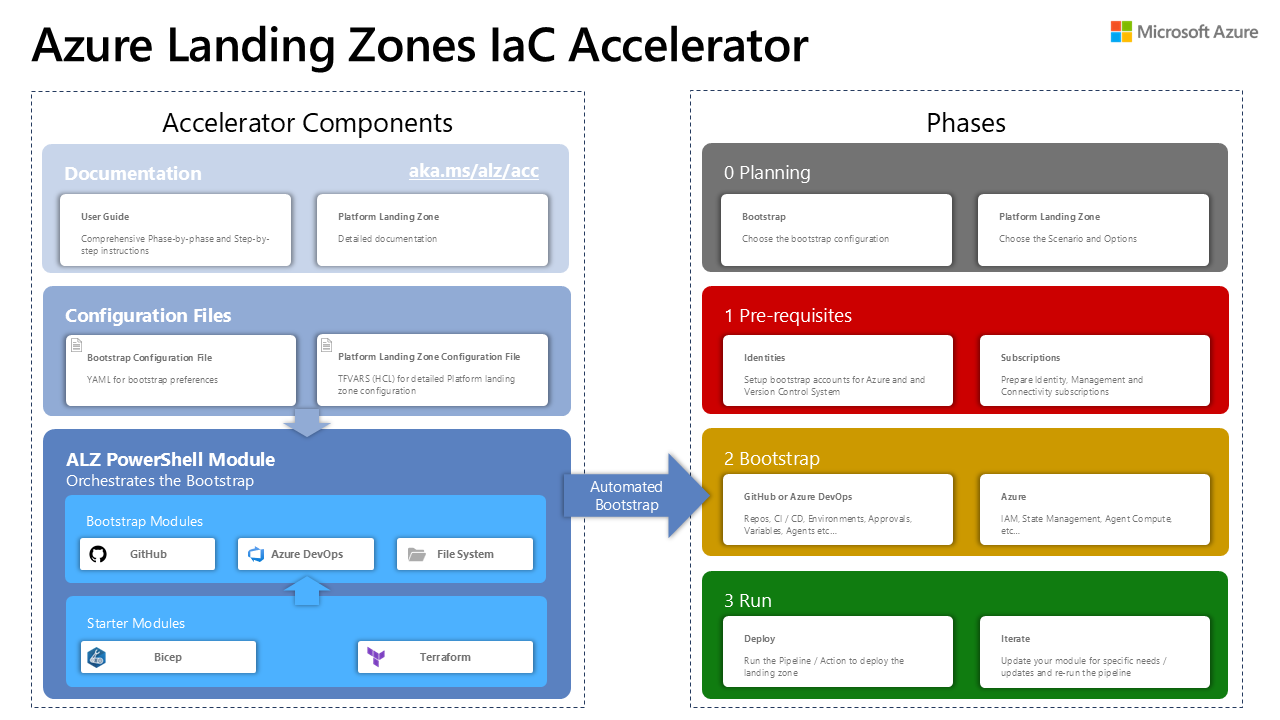
Accelerator Overview

This series will walk you through sections 1 and 2 - prereqs and bootstrap - so that you understand the process and are set for the rest of the labs with an standard config.

You will notice that the accelerator supports GitHub, Azure Devops and local file system, plus starter modules for both Bicep and Terraform. These labs focus solely on GitHub with Terraform. Refer to the official ALZ Accelerator documentation for the other options.

Starter modules

The accelerator can make use of several standard starter modules:

  • basic - A minimal configuration for small environments
  • standard - The recommended starting point for most organisations
  • hubnetworking - Includes hub and spoke networking topology
  • complete - A comprehensive configuration with all features enabled

However, in these labs we will use the undocumented empty template instead. This approach allows us to build up the configuration incrementally, providing a deeper understanding of how the components work together and how they can be customised to meet specific requirements.

It is recommended that once you are familiar with the process that you then read through the remainder of the Azure Landing Zones accelerator documentation to understand the planning process, how to use the input files for the other starter modules, and the other options available to you.

Content

Prereqs

You will need a few things before you can run the accelerator's bootstrap and work on Azure Landing Zones.

Elevate

You will need elevated privileged for the duration of the bootstrap process.

Bootstrap

The Azure Landing Zones Accelerator is very highly recommended for quickly bootstrapping a securely designed setup.

Demote

Remove the elevated privilege.

Components

A brief explanation for the various resources created by the ALZ Accelerator.

Previous ALZ Accelerator Prereqs