Components
A brief explanation for the various resources created by the ALZ Accelerator.
Overview
The Azure Landing Zone Accelerator deploys a comprehensive set of components to support your landing zone implementation. These components work together to provide a complete DevOps environment for managing your Azure infrastructure.
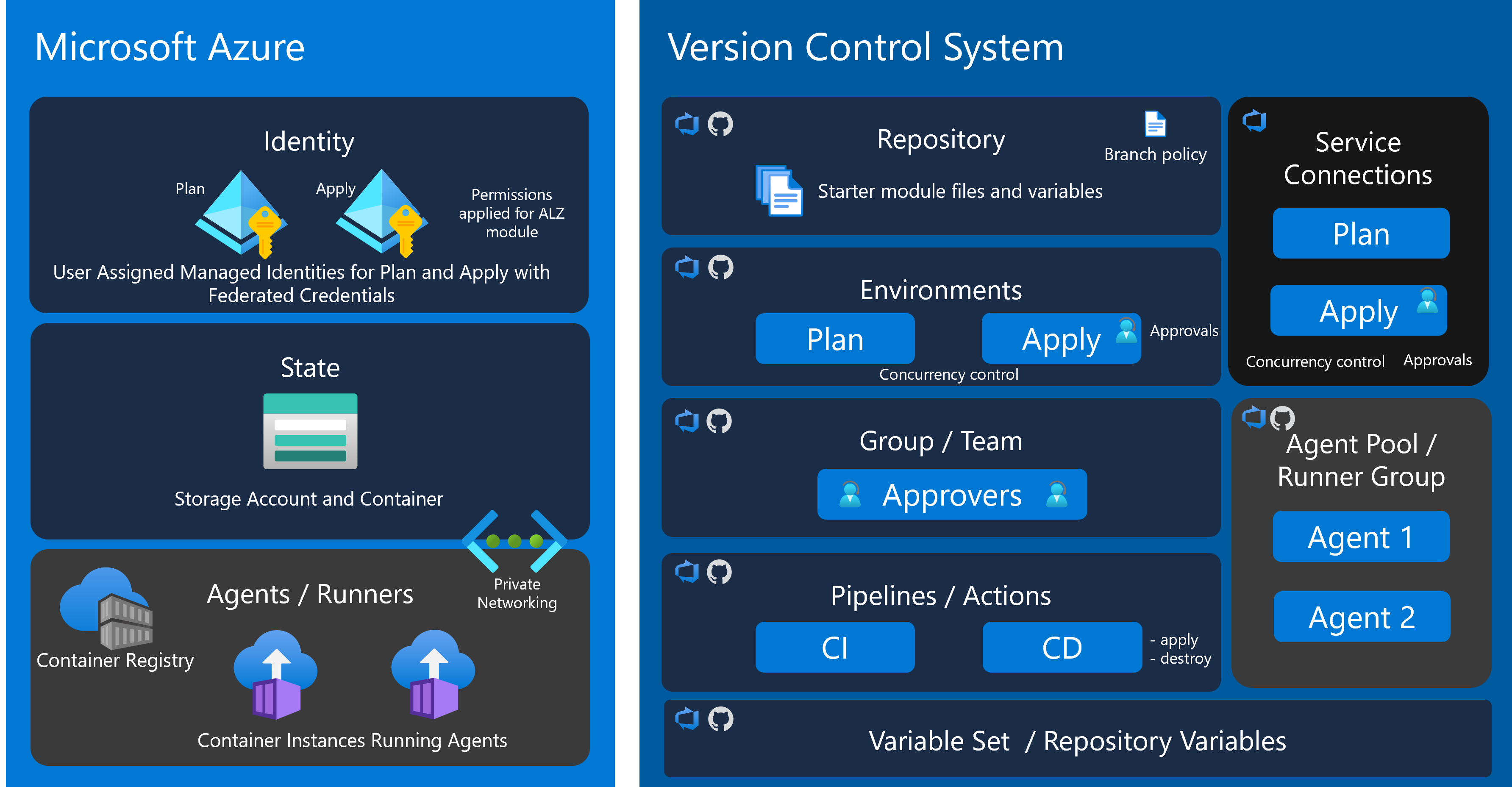
Azure
Let’s start by checking on what has been created in your management subscription. You should have four new resource groups with a rg-alz-mgmt-<desc>-<region>-001 naming convention.
- rg-alz-mgmt-agents-uksouth-001
- rg-alz-mgmt-identity-uksouth-001
- rg-alz-mgmt-network-uksouth-001
- rg-alz-mgmt-state-uksouth-001
Managed Identities
The accelerator configures the identity and authentication mechanisms required for secure access to Azure resources. This includes setting up service principals and federated credentials for workload identity federation between GitHub Actions and Azure.
By default the managed identities will be in the management subscription’s rg-alz-mgmt-identity-<uksouth>-001 resource group. There are two identities for the two workflows.
- id-alz-mgmt-uksouth-plan-001
- id-alz-mgmt-uksouth-apply-001
Plan
The plan identity is used for all plan steps. Here you can see the permissions.
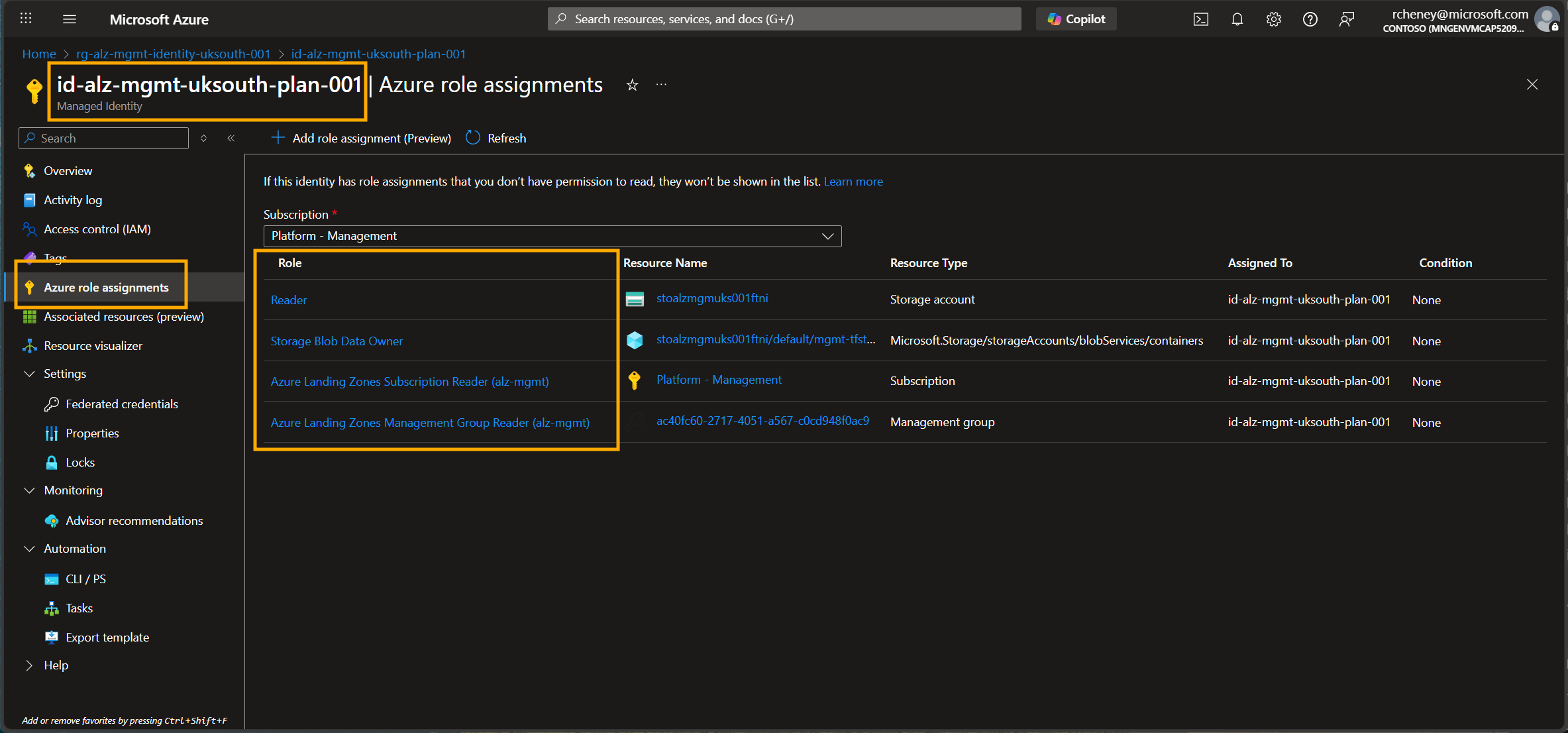
Note that the ID only has write access to a single container within the storage account used for Terraform remote state. All other permissions are a variant of reader, including the custom role, Azure Landing Zones Management Group Reader.
From the GitHub perspective, the workflows will use OpenID Connect for secret free authentication from the GitHub identity provider (IdP) to the Azure identity provider. The relationship is defined in the federated credential below, but is only valid in the context defined in the subject.
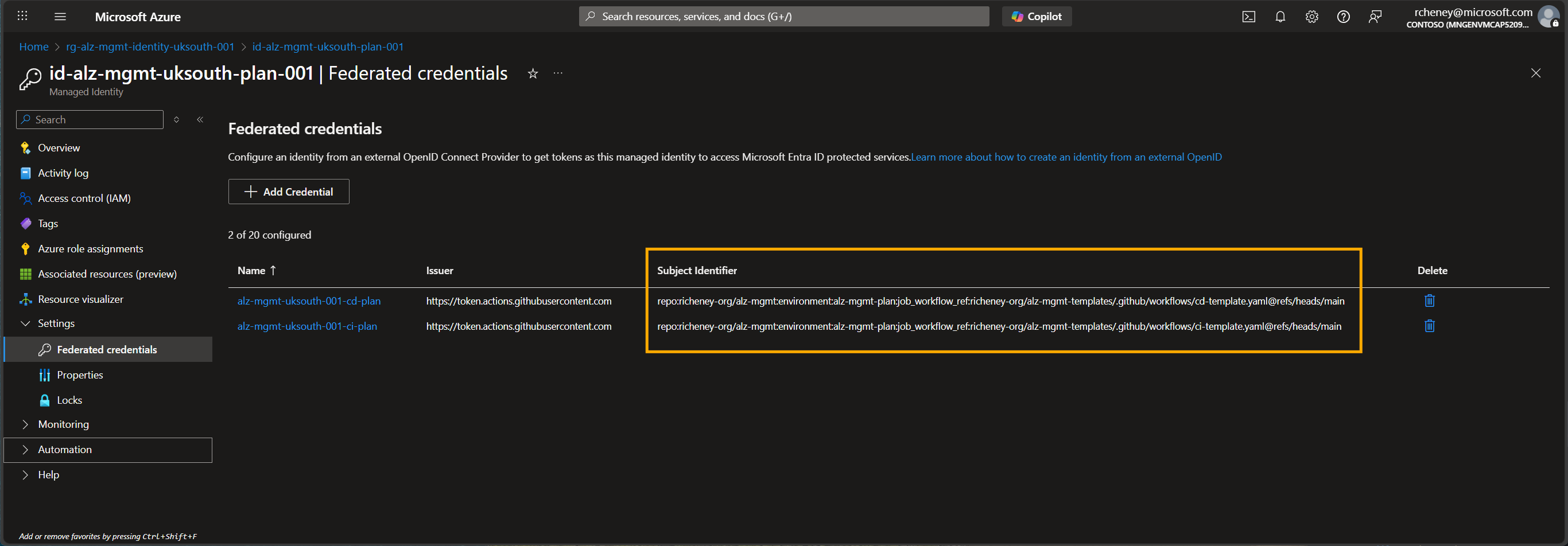
Anyone with write permissions on the repo can contribute a branch - as long as the branch is not main - and that will trigger the plan workflow to confirm that all of the checks are met successfully, but the identity is incapable of create, update, or destroy actions.
If a pull request is created then the main deployment workflow also uses the identity - in combination with the plan environment in GitHub - for the plan step, at which point it pauses, waiting for manual approval before moving to the apply step.
Apply
As expected, the second identity is linked to the apply step and associated GitHub environment. The apply managed identity has high levels of privilege, as seen below.
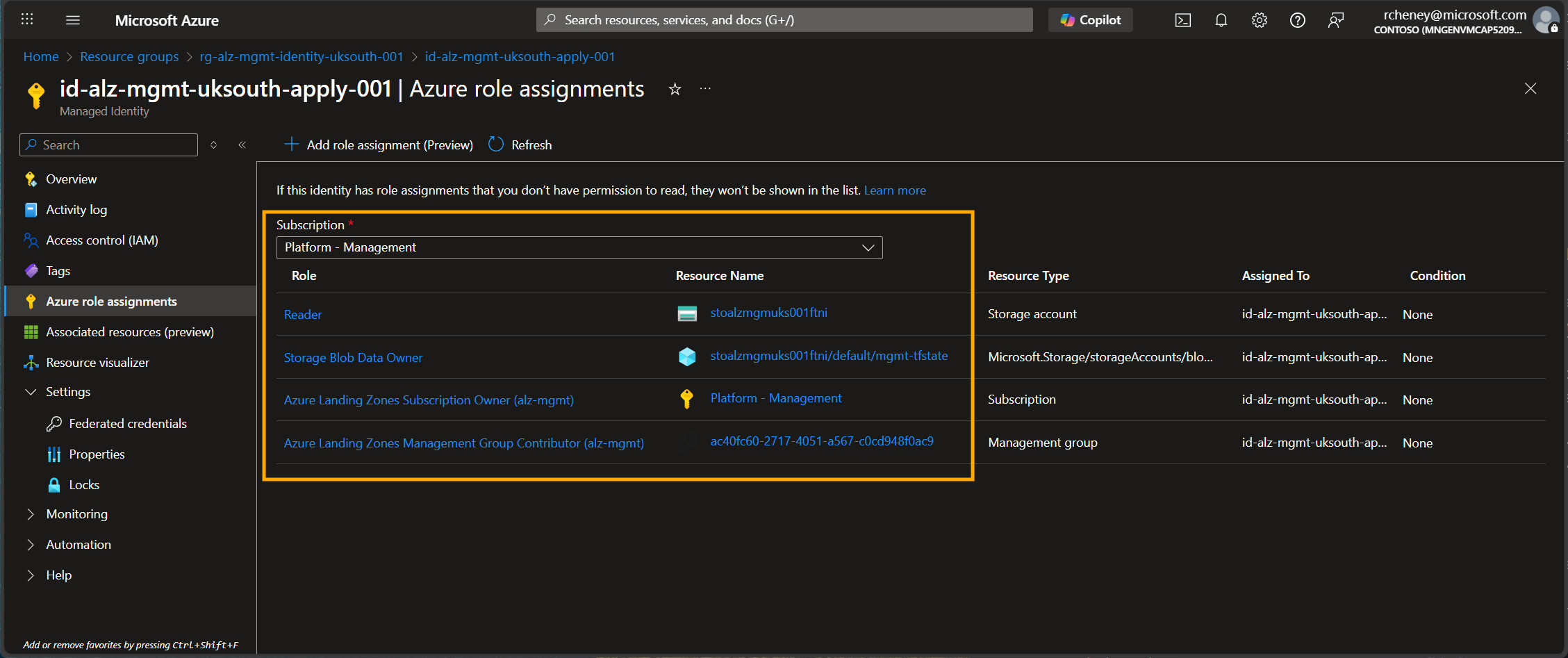
ℹ️ The managed identity will also receive additional role assignments when we deploy Azure Landing Zones, such as Owner on the management groups that will be created. Also note the use of custom roles.
Let’s examine the federated credential a little more closely as this managed identity has such elevated privileges.
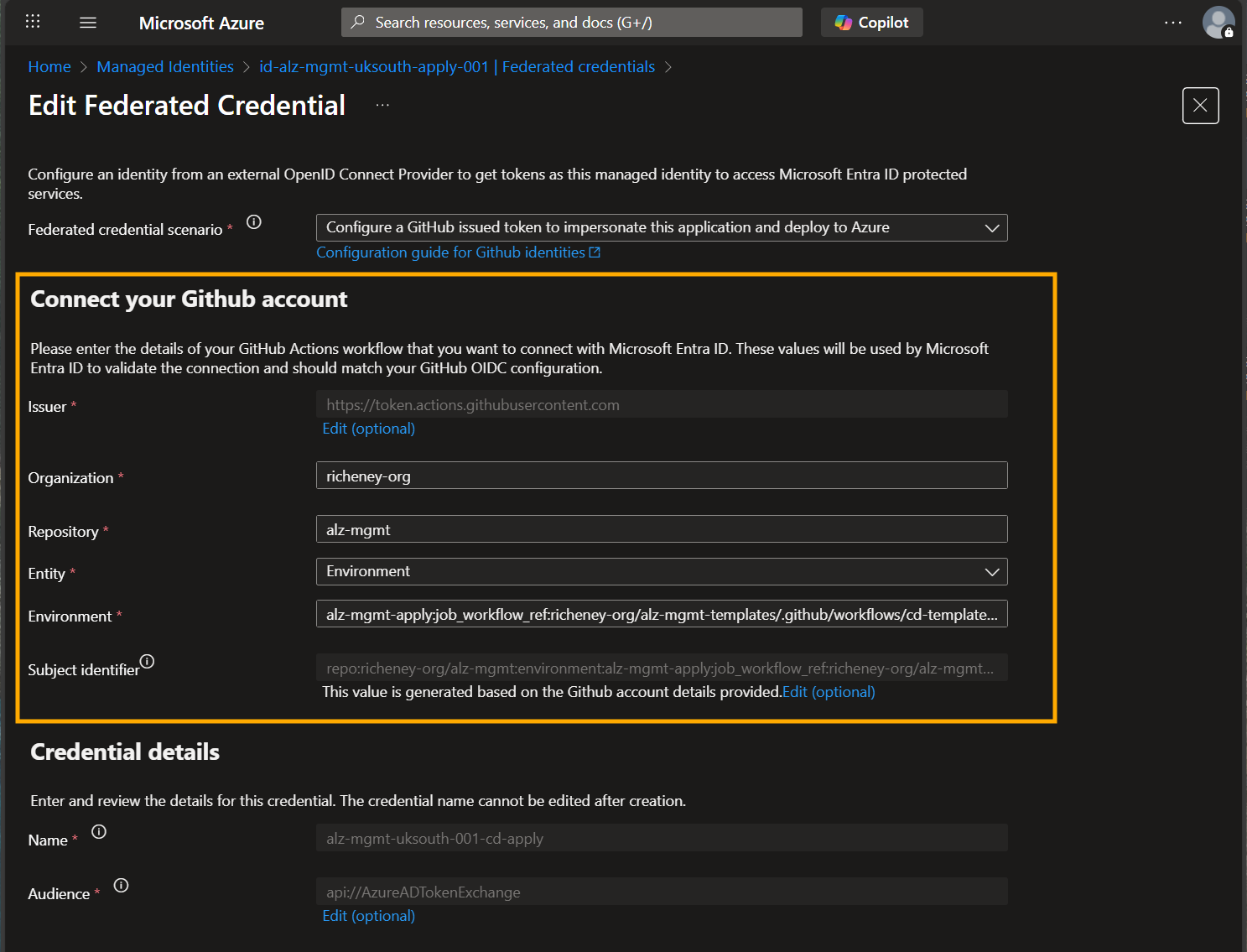 The following values in the credential must match to validate the connection:
- Organization: richeney-org
- Repo: alz-mgmt
- Environment: alz-mgmt-apply
- Branch: main
- Workflow: richeney-org/alz-mgmt-templates/.github/workflows/cd-template.yaml
⚠️ Note that whilst the calling repo must be alz-mgmt, the workflow is in a different repo, alz-mgmt-templates. We’ll see this later.
This detail is useful to remember when we check on how GitHub is configured.
Custom roles
The accelerator defines four custom roles at the tenant root group.
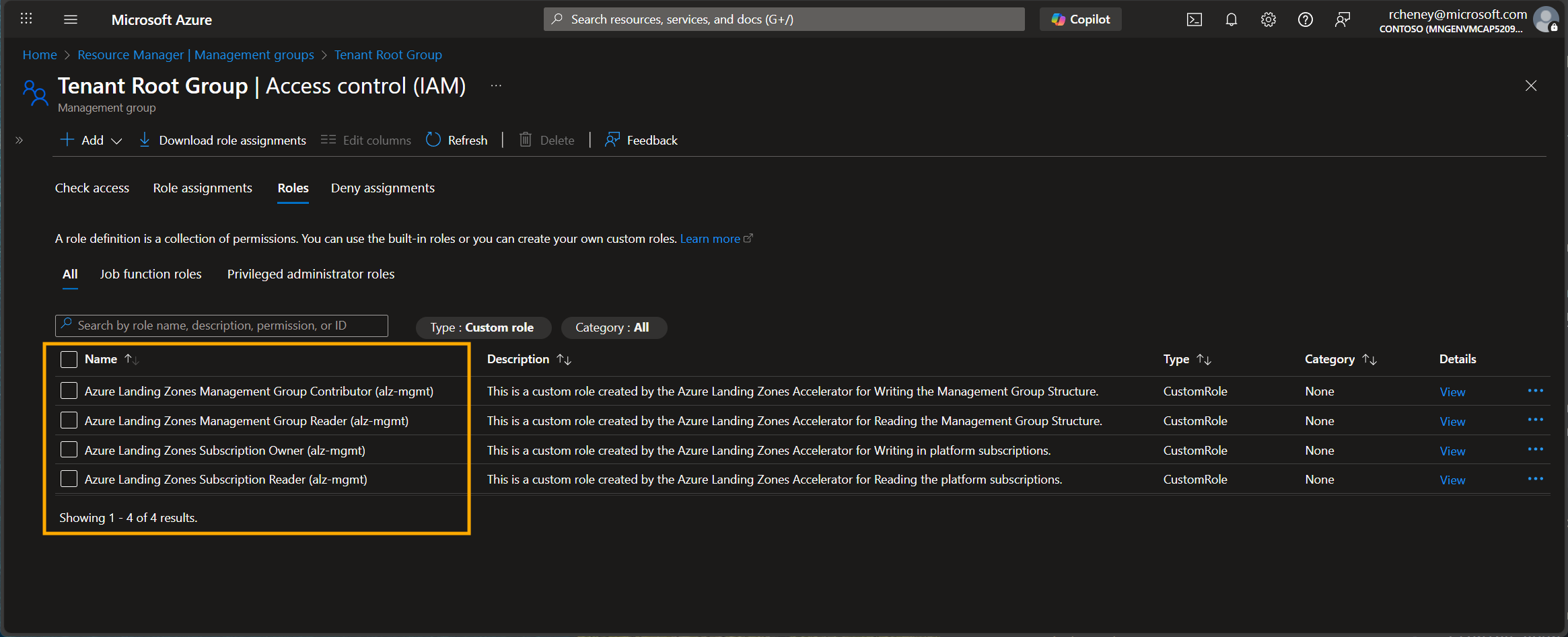
You can view the custom roles to see the table of permissions, the underlying JSON, and where they’re assigned. These roles have been specifically created to move away from roles such as Owner and define roles aligned with least privilege.
Remote State
Terraform state management is configured with a dedicated Azure Storage Account. This provides a secure, centralized location for storing your infrastructure state files, complete with remote state locking capability.
The storage account can be found in rg-alz-mgmt-state-uksouth-001 and is configured with private endpoint, TLS 1.2, HTTPS only, and RBAC authentication only. This removes the ability to authenticate using storage keys which is considered a potential security risk.
Private Runners
Self-hosted GitHub runners can be deployed to provide greater control over your CI/CD pipeline execution environment. These runners can be configured to run on Azure infrastructure with specific networking and security requirements.
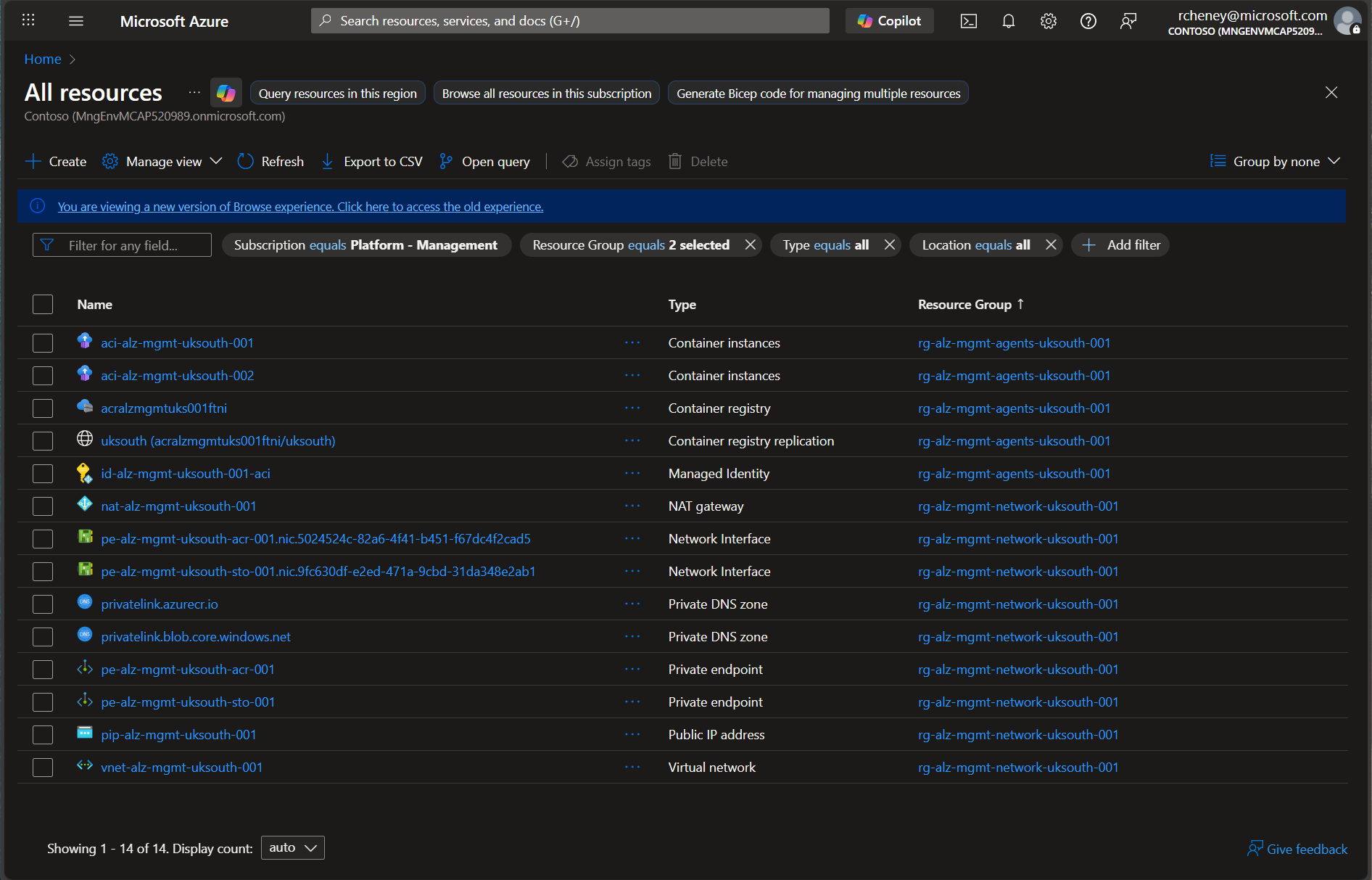
The private runners are hosted on a couple of Azure Container Instances, with virtual network integration and ACR Pull RBAC role assignment for the system. They can be found in the rg-alz-mgmt-agents-uksouth-001 and rg-alz-mgmt-network-uksouth-001 resource groups.
GitHub
OK, let’s switch focus from the Azure resources to the GitHub configuration and see how the two tie together securely.
Repos
The Azure Landing Zone accelerator has created two repositories in your organization. See the example below.
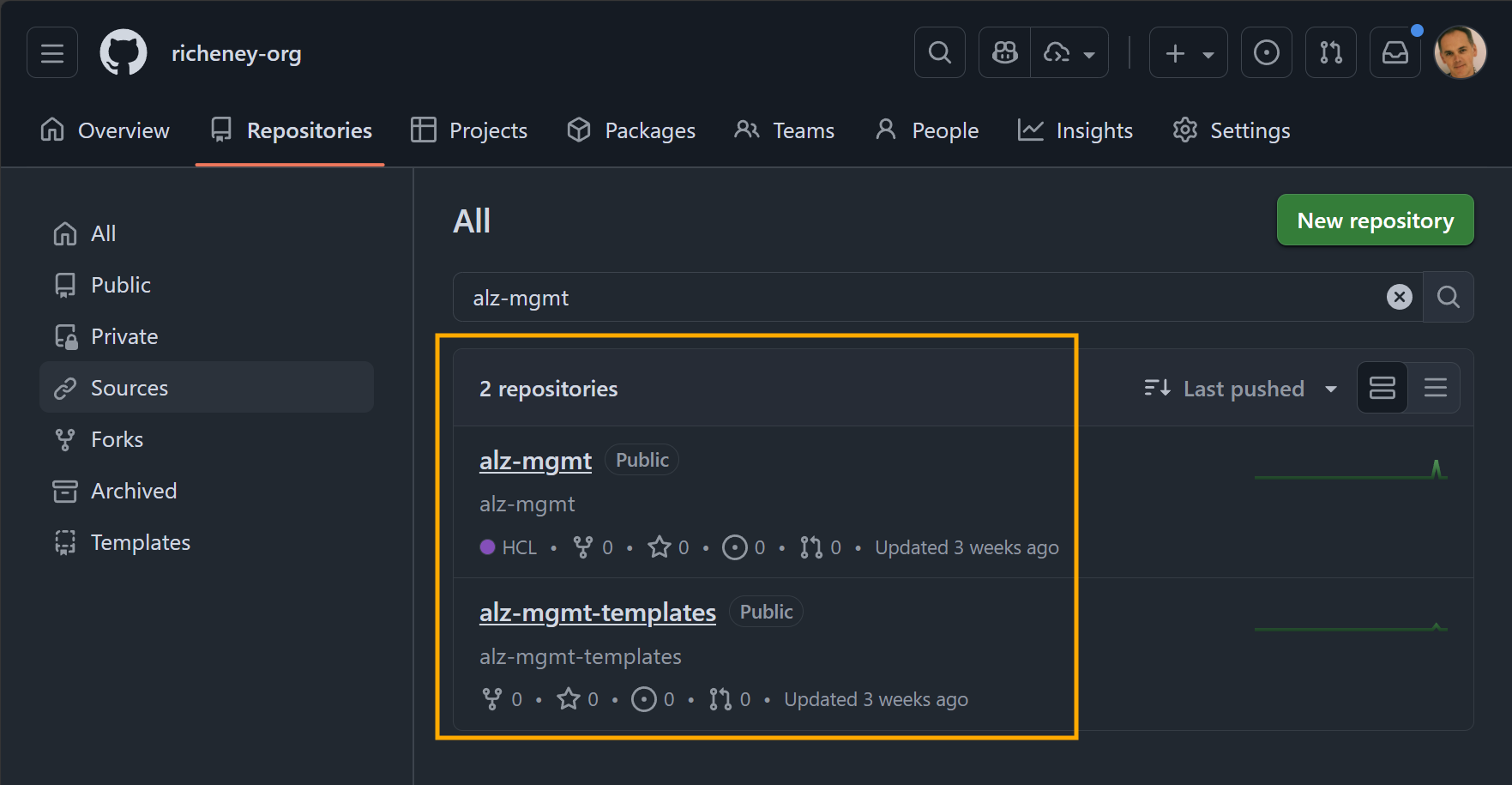
The main repo that you will be updating in these labs is the alz-mgmt repo.
When we look at the workflows you will see that these are backed off to the alz-mgmt-templates. This provides an extra level of security protection as the federated credential for the apply step could be open to abuse if a change to the alz-mgmt’s workflows was camouflaged to reviewers in a large pull request. Separating the workflow logic into an even more secure and static repository if a good practice.
Branch protection rules
The main branch on the alz-mgmt repo also has strong branch protection rules.
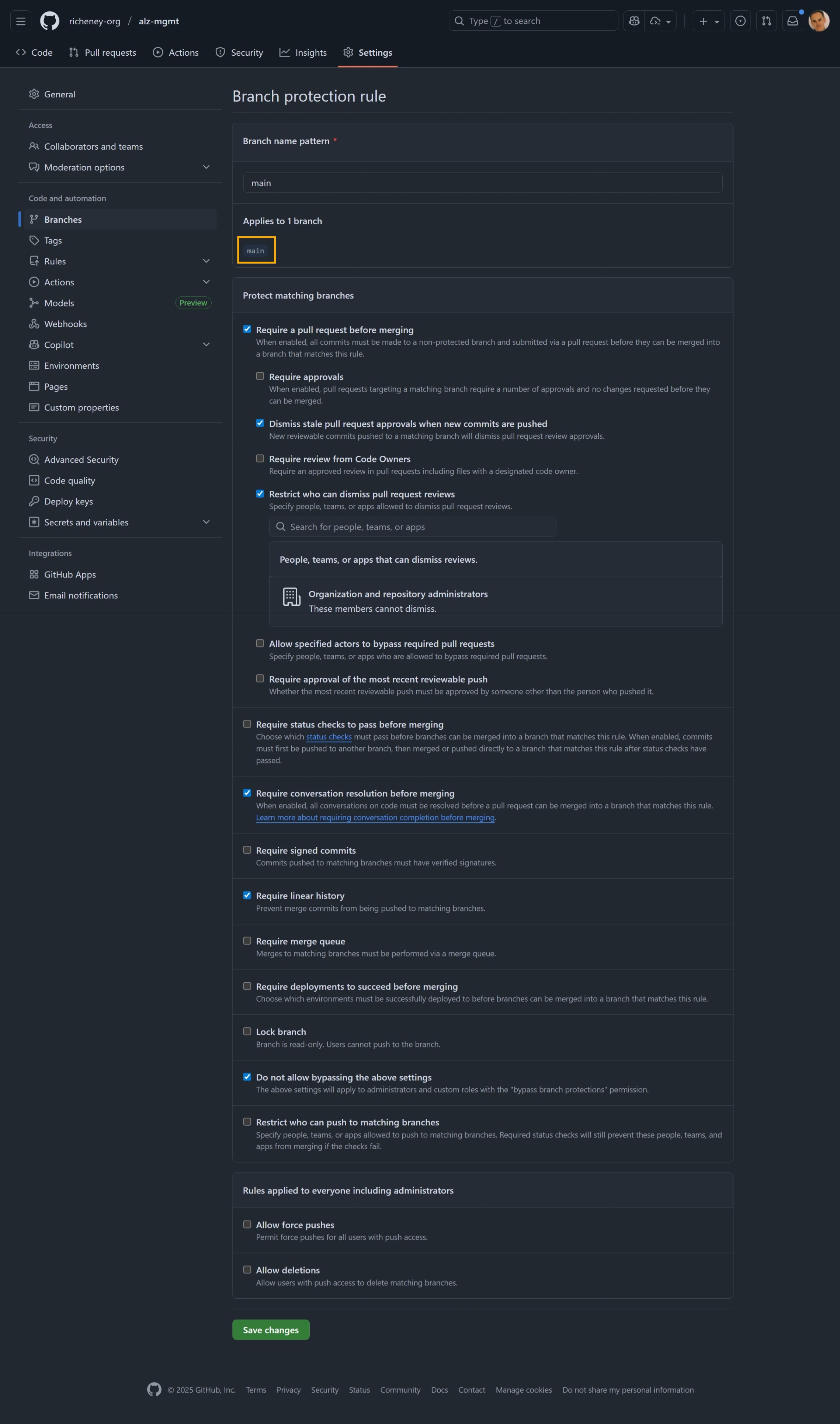
This forces all changes to be made on branches with no direct commits to the main branch. Pull requests must be reviewed before merges are allowed, and it also forces a clean and linear history with fully resolved PR review conversations.
Envs
GitHub environments are created here to align with the plan and apply deployment stages. Here they are used to safely generate plans with the continuous integration (CI) workflow and the plan step within the continuous deployment (CD) workflow using the mostly harmless plan identity.
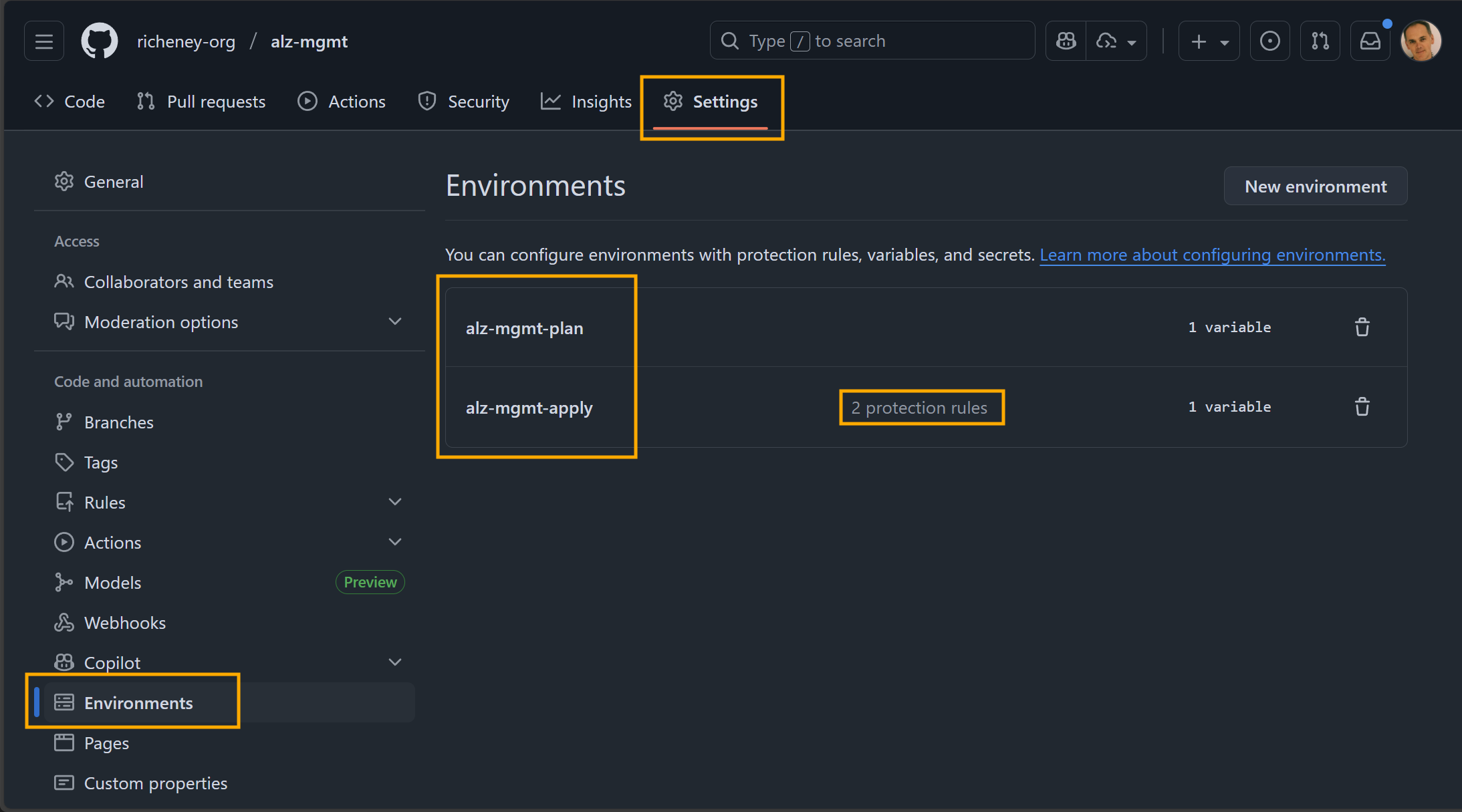
As we saw earlier, the federated credentials for the managed identities specify the environment entity, and are linked 1:1 with the GitHub environments.
The CD workflow will not progress to the apply step - which uses the apply environment and its far more powerful managed identity - without a review of the plan.
Environment rules are configured to require manual approvals before deployments can proceed. This ensures that changes to critical environments go through a structured review process.
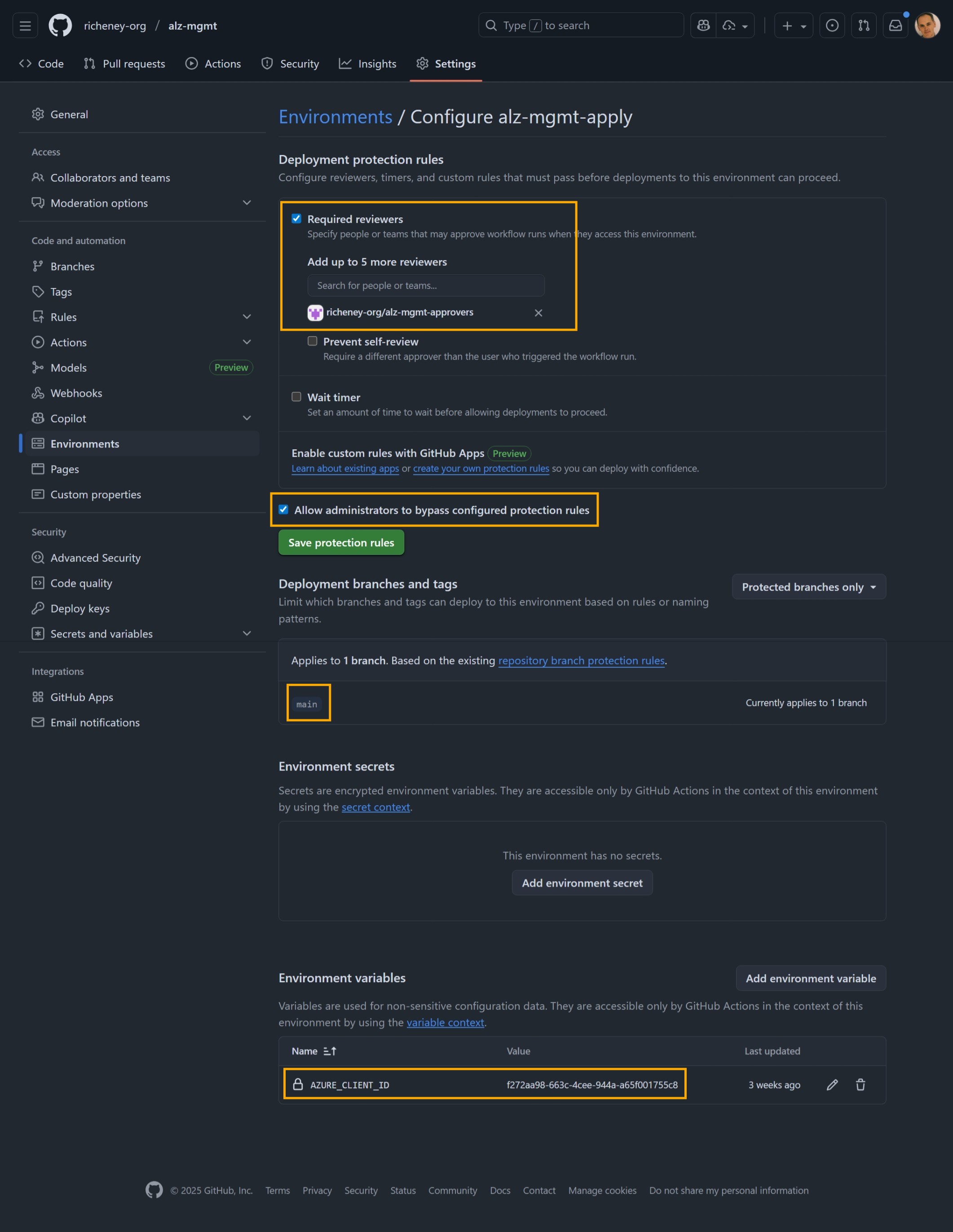
You will also see the variables for the managed identity’s client IDs are also defined at the environment level.
Variables
The Azure Landing Zones accelerator automatically configures both repository-level and environment-specific variables as used by the workflows.
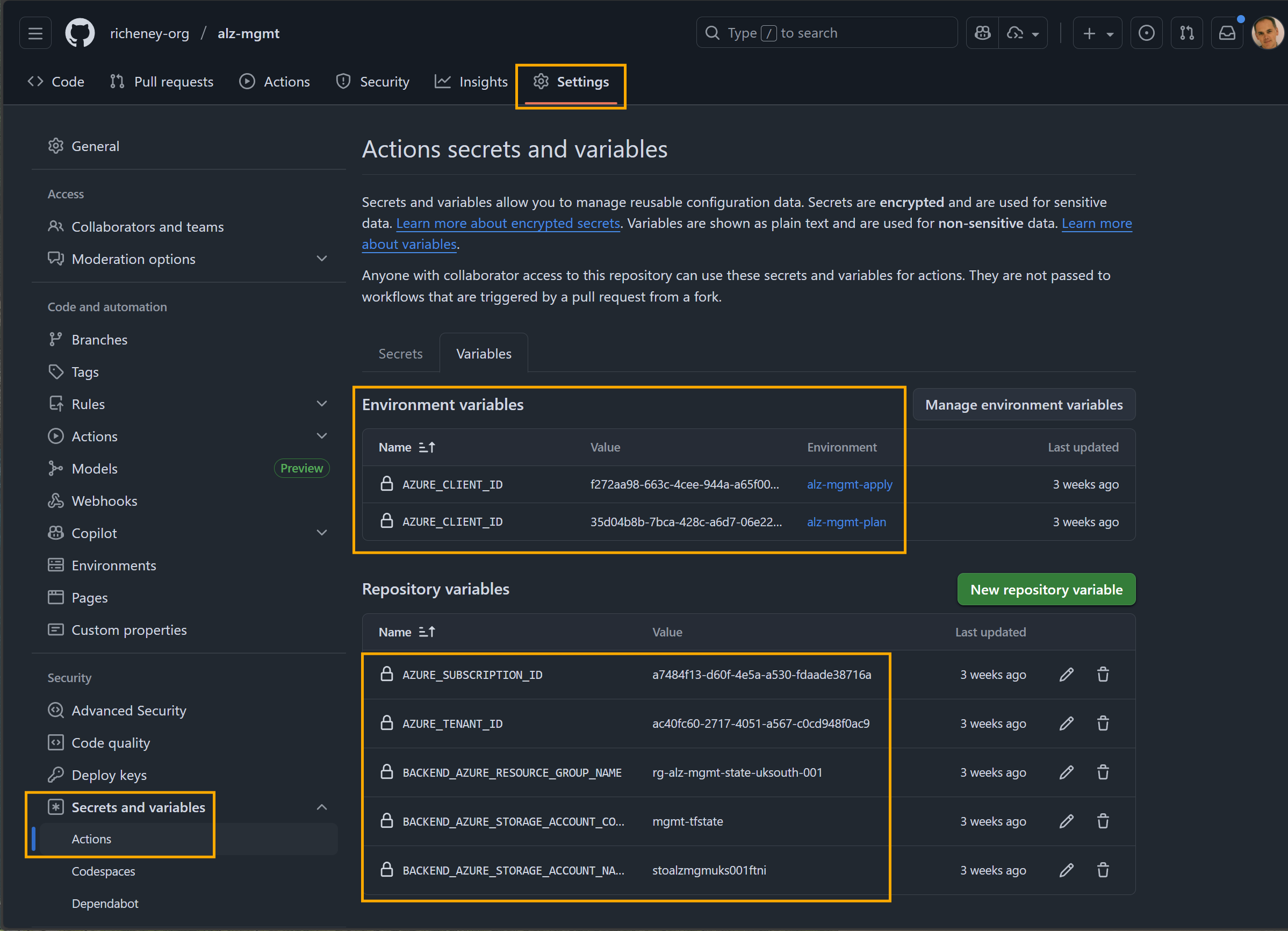
Again, you can see the AZURE_CLIENT_ID is defined at the environment level so that it will always resolve to the client id for the respective managed identity.
GitHub Actions
The two workflows in the main repo can be found in alz-mgmt’s .github/workflows folder. Both may also be triggered manually with the workload_dispatch trigger, but we’ll concentrate on the CI/CD flow.
Continuous Integration
The ci.yaml workflow is triggered on pull requests to the main branch. The workflow applies two jobs as checks in the pull request flow.
- Validate Terraform ensures it passes the standard fmt, init, and validate commands on the config.
- Validate Terraform Plan checks that the plan can be successfully generated and then adds it directly into the pull request.
The CI workflow allows a contributor to confirm that their config is in a healthy state and correct any issues before a review occurs. The included plan make it simple for standard reviews and resolution to happen within the pull request flow. All jobs are run within the alz-mgmt-plan environment.
Continuous Deployment
The cd.yaml workflow is triggered upon push into main, when a pull request is approved and merged.
- Plan with Terraform has steps to create, upload and display the plan file artifact, and is run in the alz-mgmt-plan environment.
- Apply with Terraform uses the alz-mgmt-apply environment, triggering the required manual approval via the environment rules. The approver must be one of the members of the alz-mgmt-approver team that the accelerator defined at the organization level. Once approved the job applies the configuration to the environment using the apply managed identity.
Workflow templates
The other key aspect of both workflows is that they are themselves small and lightweight and use the corresponding workflows in the alz-mgmt-templates repo.
This is where you will find the underlying steps and logic for the GitHub Actions workflows.
Self Hosted Runners
Runner groups allow you to organize your self-hosted runners and control which repositories can use them.
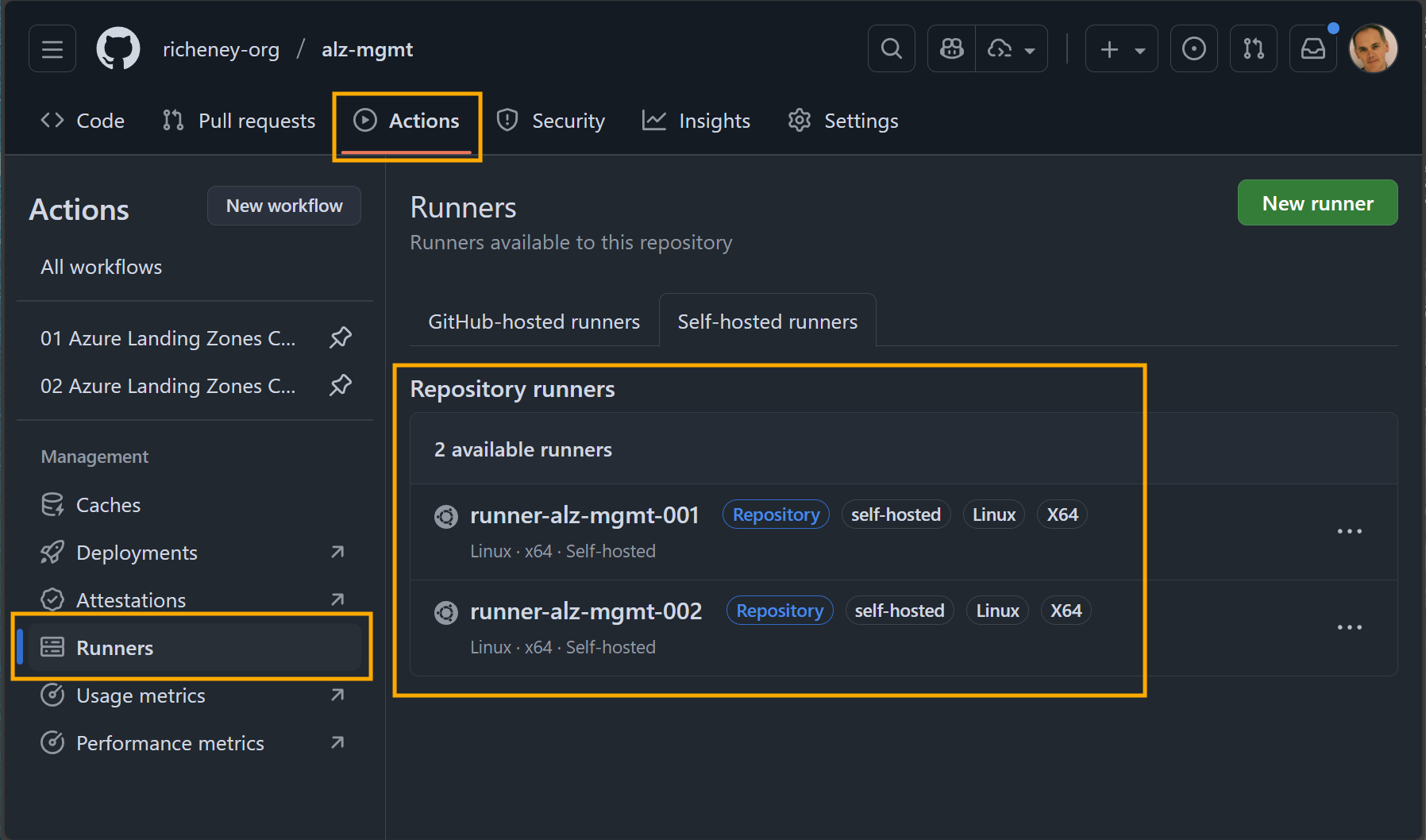
The two ACI container groups in Azure map directly to the self-hosted runners that you can see defined in GitHub Actions.
Testing the workflows
You can now run the two GitHub Actions workflows. They should complete successfully without deploying anything as we have an empty config file.
We are now set up to use the ALZ module examples to build up and deploy a configuration.