ALZ Accelerator
Learn how to use the Azure Landing Zone Accelerator to get to a GitHub CI/CD configuration recommended by Microsoft.
Introduction
The Azure Landing Zone Accelerator is a powerful tool that streamlines the deployment of Azure Landing Zones using infrastructure as code, including the Sovereign Landing Zone.
What is the Azure Landing Zones Accelerator?
The Azure Landing Zones Accelerator generates the infrastructure code, configuration files, and CI/CD pipelines needed to deploy and manage your Azure Landing Zones. This significantly reduces the time and effort required to establish a production-ready Azure environment.
It supports multiple combinations of version control (Azure DevOps and GitHub), deployment tools (Terraform and Bicep), and can be run locally or in CI/CD pipelines.
The accelerator uses a combination of PowerShell cmdlets and auto-generated Terraform configuration, but whilst it uses Terraform it should be considered a one-off deployment.
The resulting repository hosted in GitHub or Azure DevOps then contains the configuration for deploying an Azure Landing Zones or Sovereign Landing Zones. The CI/CD pipelines, least privilege workload identities, private runners, and remote state are ready for long term and structured lifecycle management of your platform landing zone.
The accelerator can also generate a standardised starter module including default networking configs.
Is the Accelerator mandatory?
Do you have to use the accelerator to deploy Azure Landing Zones? No, you don’t.
If you are already comfortable with creating secure pipelines for deploying Terraform configurations then you can absolutely go it alone.
However, the accelerator does create a Microsoft recommended configuration with security and control front of mind. As the workload identities used for deployment of an Azure Landing Zone require very highly privileged roles then the combination of OpenID Connect federated credentials, managed identities with specific RBAC role assignments, strict branch controls and review process, and separated workflow repo all combine to give a strong set of protections. Even if you do create your own CI/CD configuration then I would recommend reading the components page to understand how the various parts come together.
As noted, the accelerator really servers two functions:
- configures a good CI/CD configuration for your preferred combination so that your Azure Landing Zone repo can be managed and deployed in alignment with recommended practices
- preloads that Git repo with an example configuration - with inputs from you - to accelerate the deployment
We will make use of the first part, but will start (almost) from scratch for your repo so that you see how it builds up. This will give you a better understanding of how to manage these environments.
Process
The diagram below shows the overall process and components for the Azure Landing Zone accelerator.
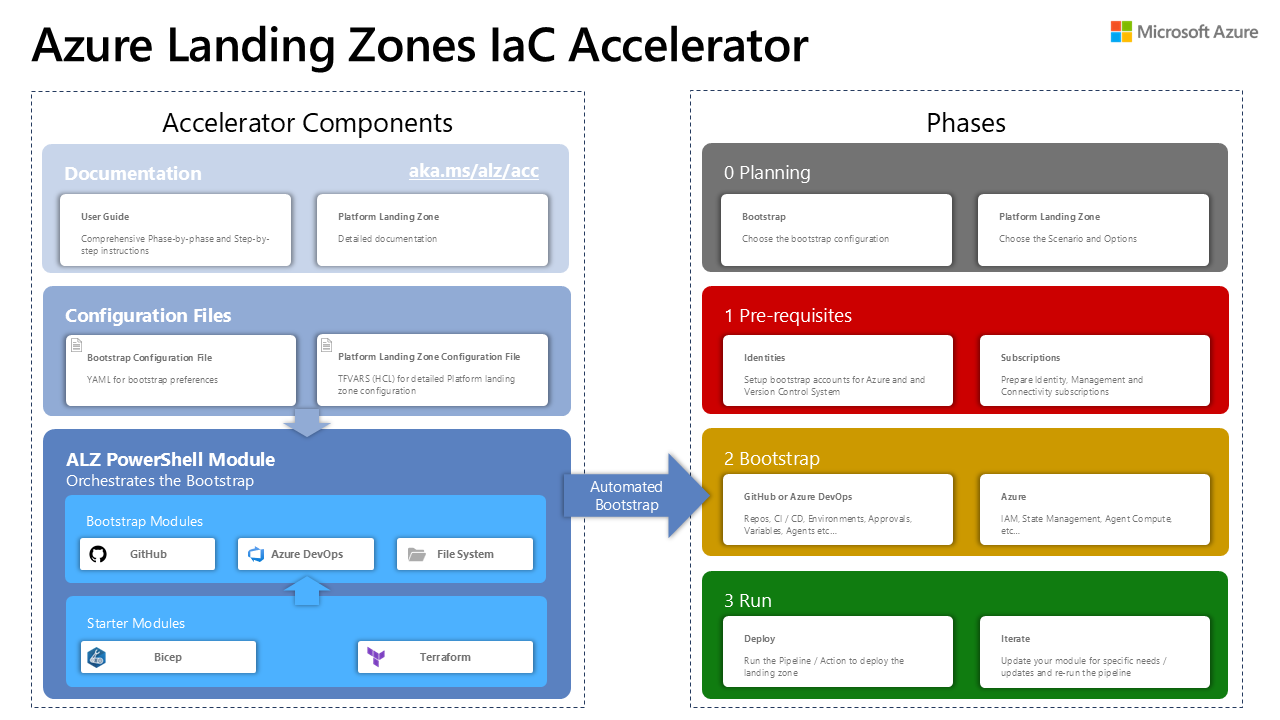
This series will walk you through sections 1 and 2 - prereqs and bootstrap - so that you understand the process and are set for the rest of the labs with an standard config.
You will notice that the accelerator supports GitHub, Azure Devops and local file system, plus starter modules for both Bicep and Terraform. These labs focus solely on GitHub with Terraform. Refer to the official ALZ Accelerator documentation for the other options.
Starter modules
The accelerator can make use of several standard starter modules:
- basic - A minimal configuration for small environments
- standard - The recommended starting point for most organisations
- hubnetworking - Includes hub and spoke networking topology
- complete - A comprehensive configuration with all features enabled
However, in these labs we will use the undocumented empty template instead. This approach allows us to build up the configuration incrementally, providing a deeper understanding of how the components work together and how they can be customised to meet specific requirements.
It is recommended that once you are familiar with the process that you then read through the remainder of the Azure Landing Zones accelerator documentation to understand the planning process, how to use the input files for the other starter modules, and the other options available to you.
Content
Prereqs
You will need a few things before you can run the accelerator's bootstrap and work on Azure Landing Zones.
Elevate
You will need elevated privileged for the duration of the bootstrap process.
Bootstrap
The Azure Landing Zones Accelerator is very highly recommended for quickly bootstrapping a securely designed setup.
Demote
Remove the elevated privilege.
Components
A brief explanation for the various resources created by the ALZ Accelerator.